ChipChop Support Forum
Log in
Log out
Join the forum
My Details
REPLIES: 8
VIEWS: 223
BACK
REPLY TO THIS POST
TomaszB
04 Feb 2026
ChipChop.getMyStatus -can't get status of numeric value
Hi


I'm impressed how ChipChop has been developed in the last year. One of my biggest concerns - memory consumption on ESP8266 seems to be resolved!!!

But now I've started to play with the new great feature - ChipChop.getMyStatus() .

However, in my case it works well with text values but not with numeric ones:


        void ChipChop_onCommandReceived(String &component,String &value, String &source, int command_age){
Serial.println("ChipChop_onCommandReceived: component="+component+" value="+value+" source="+source+ command_age="+command_age");
}


void ChipChop_onStatusReceived(String &component,String &value, String &source){
Serial.println("ChipChop_onStatusReceived: component="+component+" value="+value+" source="+source);
}

Ticker recalculate_ticker;
int counter=0;
void setup(){

Serial.begin(115200);
delay(500);

#ifdef WIFI_PORTAL_EXISTS
//advanced WiFi start - WiFi Portal module has to be included
WifiPortal.start(WIFI_SSID, WIFI_PASSWORD);
#else
//basic WiFi start
WifiStart();
#endif


ChipChop.debug(true); //set to false for production
ChipChop.start(wifiClient, server_uri, uuid, device_id, auth_code);
ChipChop.addListener(CC_COMMAND_RECEIVED, ChipChop_onCommandReceived);
ChipChopModules.start();


recalculate_ticker.attach_scheduled(10,[](){
ChipChop.updateStatus("num_val",counter);
ChipChop.updateStatus("text_val",String("counter by text=")+counter);
counter++;
ChipChop.getMyStatus();
});
ChipChop.addListener(CC_STATUS_RECEIVED,ChipChop_onStatusReceived); //This one pulls only text value
//ChipChop.addListener(CC_STATUS_RECEIVED, ChipChop_onCommandReceived); //This one doesn't work at all
}


Below in cosole logs I see that it gets two parameters (as expected) but the first one has empty name and value.
Console:
hipChop_onStatusReceived: component=device_40f478236c12 value= source=
ChipChop_onStatusReceived: component=device_40f478236c12 value=text_val source=counter by text=31
ChipChop <<< timestamp: 1770238689
ChipChop >>> Event sent --> getMyStatus:1
ChipChop_onStatusReceived: component=device_40f478236c12 value= source=
ChipChop_onStatusReceived: component=device_40f478236c12 value=text_val source=counter by text=31
ChipChop >>> Heartbeat: {"num_val":32} , {"text_val":"counter by text=32"}
ChipChop >>> Event sent --> getMyStatus:1
ChipChop_onStatusReceived: component=device_40f478236c12 value= source=
ChipChop_onStatusReceived: component=device_40f478236c12 value=text_val source=counter by text=32
ChipChop >>> Heartbeat: {"num_val":33} , {"text_val":"counter by text=33"}

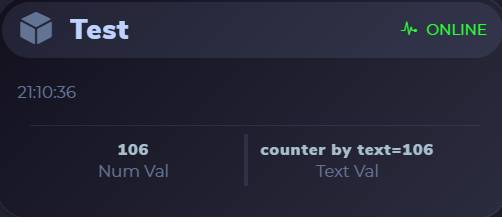
Dashboard:


Documentation:

The callback function for getMyStatus is described in documentation as: void ChipChop_onStatusReceived(String &component,String &value, String &source, int command_age) but it doesn't work at all. The callback defined without the last argument - int comman_age seems to work but provides status only for text values. It also seems that source and value parameters are swaped, but certainly it is not a big deal .

Kind regards
Tomasz


i


Attached images
Gizmo
05 Feb 2026

Hi Tomasz,

My apologies, I have added soo many new things that I've made a mistake in the docs...my fault. Thank you for pointing it out so quickly!
I have corrected the documentation but I need to add a little bit more explanation on how it's used. I am working right now on an extra section in the docs "Code Examples" and that will include a proper example of the getMyStatus()

The CC_STATUS_RECEIVED emits 3 String values so the callback function needs to have this signature:


    void ChipChop_onStatusReceived(String &device, String &component, String &value){

        // if you expect numeric values then you need to cast them i.e. int temperature = value.toInt() or value.toFloat()
    }


Just to give you a bit more info:

You may find it strange why the CC_STATUS_RECEIVED emits as the first parameter String &device?

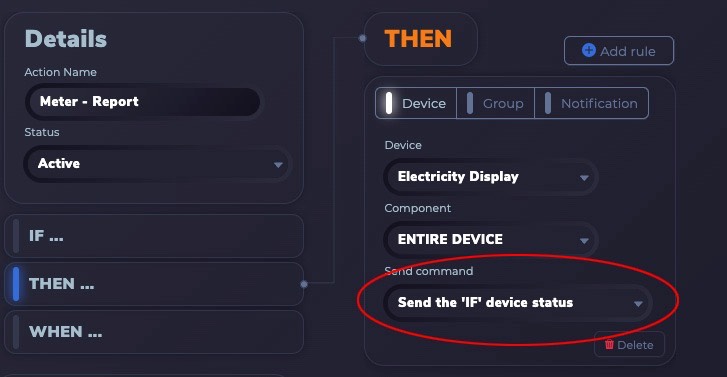
The reason is that this event will also get triggered not only on getMyStatus() but also if you use in an Action >> Then >> Send Command >> "Send the IF device status" so you can then identify to which device the received status belongs to


This feature is extremely powerful as it enables you to have multiple devices operating as one (like a mesh network but over the internet so distance is unlimited)

- for example you can have one primary thermostat device that controls the heating and multiple separate devices with temperature sensors in different parts of the house.
- all separate temperature devices can forward their sensor reading using the Action to the primary thermostat which receives them through the CC_STATUS_RECEIVED
- The great thing with this approach is that in the code of the primary device you can use the logic as if the device itself had temperature sensors physically attached to it but actually it will get them automatically from completely separate devices

I use this approach on my house alarm system, heating and solar panels/electricity monitoring

Let me know if you need more explanation and I will double check today that the getMyStatus() is working correctly.

Gizmo

p.s. On a different topic, the reason why you have a much better memory consumption on the ESP8266 is because ChipChop has now its own custom communication protocol specifically designed for IoT and doesn't have to use the standard TLS encryption which I think on an ESP8266 eats up around 15K of ram + whatever ram the actual tarsnport protocol needs (websockets/mqtt) .
The ChipChop protocol handles a 256 bit encryption internally and directly on the data stream so it's a lot faster and everything in total fits in around 4kb :-)


Attached images
TomaszB
05 Feb 2026

Hi Gizmo

Thanks for the instant answer.

The casting of callback string argument to appropriate type is clear for me. However, please take a look at my use case and console logs.

I have two variables / components. The first has text type and is called “text_val”, the second has numeric type and is called “num_val”. After executing ChipChop.getMyStatus(), the callback function shall be executed twice for each of these components.
In my case, indeed it is executed twice, and for text_val it provides properly component’s name and its value, but for num_value it has empty “component” and “value” arguments (the second and third argument).
My callback function (ChipChop_onStatusReceived) does only one things - prints to serial console values of all arguments.

ChipChop >>> Event sent --> getMyStatus:1
ChipChop_onStatusReceived: component=device_40f478236c12 value= source=
ChipChop_onStatusReceived: component=device_40f478236c12 value=text_val source=counter by text=31
ChipChop >>> Heartbeat: {"num_val":32} , {"text_val":"counter by text=32"}

Kind regards
Tomasz
Gizmo
05 Feb 2026

aha, ok, let me try to reproduce it and I will let you know (give me couple of hours)

Gizmo
05 Feb 2026

I've found the problem, it was two lines of code in ChipChopEngine.cpp swapped around!

I've updated the Code Builder so you can just re-download the code package (it can be for any of your devices) and just replace the "ChipChopEngine.cpp" (it's in the downloaded "/src" folder)

Or you can just manually edit the ChipChopEngine.cpp,

Incorrect (the component="" and value="" needs to be after the emit_received)

find the line 516


//line 515
if(request[i] == CC_OBJECT){
component = ""; //<<< this is in the wrong place
value = ""; //<<< this is in the wrong place

if(i != x){
emit_received_event(CC_STATUS_RECEIVED,device, component, value);
}

read_type = 0;
continue;


Should be


if(request[i] == CC_OBJECT){

if(i != x){
emit_received_event(CC_STATUS_RECEIVED,device, component, value);
}

component = "";
value = "";

read_type = 0;
continue;


Oh, on another note, whilst I was trying to figure out what the issue was I have noticed the ChipChop server where your devices are constantly switching your Actions on/off!?

I can't see your Actions or anything inside your Dev Console but I can see the server complaining and normally that would mean that you have potentially something illogical in your Actions, like some sort of circular logic or something that can potentially create a "cascading" effect that can trigger a cascade of same things:

Example:
Current device 1 state is D
Action 1 - Device 1 >> state != A >> do something A
Action 2 - Device 1 >> state != B >> do something A
Action 3 - Device 1 >> state != C >> do something A

ChipChop engine will try to handle stuff like that and may decide to de-activate the Actions so check your actions in case there is something that can cause a logical loop or multiple actions to execute the same thing one after another.

If you want me to have a look at your Dev Console you can give me temporary access My Account >> Request Support >> Generate Access Key and just post the key here (it's only of use to me )


TomaszB
05 Feb 2026

I've checked these actions and I don't see anything suspicious. Can you look at them, please.
ea2e8345-a4d1-4ed6-a6f7-ad603dc78775

Tomasz
Gizmo
05 Feb 2026

I had a quick look at your actions and yes, you could have a big potential issue ! :-)
This would be what I call a "negative cascading effect" and theoretically you could start receiving 6 notifications every 10 seconds if the temperature drops to less than 2Cº

The issue is that you are probably looking at the actions as a

Doesn't work like this
If ( action 1 == true) {
    do something
    return

}else if (action 2 == true ){
    do something
    return

}else if( action 3 == true){
    do something
    return
}

It's like this
Each action is an independent IF statement

if(action 1 == true ){
    do something
}
if(action 2 == true ){
    do something
}
if(action 3 == true ){
    do something
}

So, your actions are
    
    Temp < 2C >> send notification
    Temp < 3C >> send notification
    Temp < 4C >> send notification
    Temp < 5C >> send notification
    Temp < 6C >> send notification
    Temp < 8C >> send notification

That means that if the Temp < 2 all actions will be true and execute one after another (or if Temp is < 6 then last two would execute etc...)


The question is how to get this logic to work???

Well, one option is with the new Dev Console Actions you can now add an "AND" so you can do something like this:

IF Device 1 > Indoor Temperature < 3 AND Device 1 > Indoor Temperature > 2
...
IF Device 1 > Indoor Temperature < 8 AND Device 1 > Indoor Temperature > 6 (I've changed this one so you can have a look)


I think would solve the cascade effect so each Action is encapsulating the temperature range of interest.


The problem that will still exist is that you would still get a notification every 10 seconds as the device sends its heartbeat whilst the temperature is in less than 8C range

so you need something to block the notifications for some time and that's going to be a pain in the ass to achieve elegantly !

I think the way I would handle it is by having just one action and adding one extra component to the device:

1. add an extra component called "alertblock" - type number (or something like that)
You need two actions:
2. Action 1 (you need two rules that will execute)
    IF Device > Indoor Temp < 8 AND alertblock == 0
    Rule 1:
    send notification "Temperature Low >>>" (tick "Send component status")
    You should receive a notification something like "Temperature low >> 3.2" (or whatever the sensor reading is)
    Rule 2:
    Device >> Entire Device >> As Text >> "alertblock_1"
    (Currently you can't target a component on the same device that is also a trigger so we have to send it like this)
3. Action 2 - this will tell the device to reset the alert block if the temperature goes over 8C
    IF Device > Indoor Temp > 8 AND alertblock == 1
    Rule:
    Device >> Entire Device >> As Text >> "alertblock_0"

4. in the device code


bool alertblock = 0;
unsigned long reset_alertblock_timer = 0;

void ChipChop_onCommandReceived(String &component,String &value, String &source, int command_age){
    if(component == "any"){
            if(value == "alertblock_0"){
                alertblock = 0;
                ChipChop.updateStatus("alertblock", 0);
                reset_alertblock_timer = millis();
                
            }else if(value == "alertblock_1"){
                alertblock = 1;
                ChipChop.updateStatus("alertblock", 1);
            }
    }

}

void setup(){

    ......

    ChipChop.updateStatus("alertblock", alertblock);

}

void loop(){
    
.....

    // this is optional, it would allow new notifications after 30 mins if the temperature is still low
    if(alertblock == 1){
        if(millis() - reset_alertblock_timer > 1800000){ //30 minutes
            alertblock = 0;
            ChipChop.updateStatus("alertblock", alertblock);
        }
    }

}


This is just a quick and dirty example, let me know what you think



TomaszB
05 Feb 2026

Hi Gizmo

The fix works as charm - Thanks!

Alerts:
1) Thanks for hints. I will try to implement them (but I will need some time - definitively longer than a few hours).
2) I thought that Actions are triggered once, on condition chage. Thus, if temperature drops, the action (in my case notification) is fired when temperature reaches defined threshold.
3) I still don't understand why you observed " your devices are constantly switching your Actions on/off!" because the indoor temperature never dropped below 8 degrees. Thus regardless of triggering logis (state vs transition) it should remain silent. In fact I haven't got any temeperature related notification.

Kind regards
Gizmo
05 Feb 2026

Lol...yeah may take you some time to go through it all...sorry if I've overloaded you with information!

Here's some answers:

1. Actions can't take into account what the previous condition was as sometimes you would also want to keep the action happening all the time (that's what you would use with the forwarding of the status from one device to another)

I actually don't know how I would implement an "on change only" action behaviour? You still need some sort of flag somewhere (like in my example) to track that the change has happened and only on a certain threshold it's then considered a change again.

If you can give me an idea how you think it should work I am more than happy to implement it in the Actions interface (no rush)

2. What I observed with your Actions going on/off is nothing to do with the actions actually executing (I normally don't look at it, it's just because I was checking your account I've noticed it)
It's just an internal warning mechanism that the ChipChop engine does when it goes through the heartbeat execution (the actions are a part of the heartbeat process)
In essence the engine runs occasionally an internal "emulation" where it checks if the device actions won't cause a endless loop or a cascade and can start switching things on/off if it's suspicious. I normally don't look at it as if it switches your actions off you will notice that something is wrong and if you can't figure out what's going on you will contact me :-)

I've designed ChipChop to protect itself so anything that can cause a drain on the processing it will kill first and then we'll figure out why :-)