ChipChop Support Forum
Log in
Log out
Join the forum
My Details
REPLIES: 11
VIEWS: 143
BACK
REPLY TO THIS POST
TomaszB
27 Feb 2026
Alerts & notifications - some ideas
Hi Gizmo

This is a proposal of some improvement rather than any bug report thus it is not urgent at all.


Currently notifications are triggered repatidly, when alert conditions are met. It easily can lead to continous flux of notifications, if user's code doesn't handle their supression correctly. However, the handling of supressions on client's side cannot be 100% reliable (a communication channel can drop, a power supply can break, an unexpected restart can occur). What if there are three modes of alert trigering?
1) By state (default) - the same logic like currently is implemented.

2) By transition - the alert is generated only once, instantly when its condition is met.

3) By state & time based- the alert is generated instantly when its condition is met and later it is triggered periodically in a user's defined interval (e.g. if a device is offline it would be enough to do it once a week, but when a temperature is below a threshold, it goes every hour).

Kind regards
Tomasz
Gizmo
28 Feb 2026

Hey Mr T,

I am always happy to improve things and I know, notifications can bite you in the ass if you are not careful !!! 😂

Let's brainstorm together this, I think I need to give you a little bit more technical detail how Actions work as it may answer some of your concerns.

Actions rules

- When you create an Action it is saved as a part of a device Cloud description - it's the device you specify in the IF statement (ignore the AND/OR) and a device can have many actions as a part of its internal description

- Actions are not some separate mechanism that the ChipChop server runs on some interval, they are a core part of a device and they are explicitly driven by a device

- The Actions are checked and executed only when the ChipChop engine receives a device heartbeat with the latest statuses
    - the logic for this mechanism is that we can only know for sure a state of some component when the device sends it
    - technically this happens every 10 seconds - heartbeats are by default sent every 10 seconds

- If a devices is dead or for any reason not able to send a heartbeat (loss of wifi, internet connection, crash etc...) its Actions can not be executed - the only thing that doesn't behave like that is the "off-line" check but that's a global server algorithm

So, basically if a device is off-line for any reason then the server will not send any notification

Here's some questions for you (in no particular order)

Your point 2. "By transition" - not sure how we can reliably decide what a state transition is, technically the ChipChop engine only knows the previous status and the latest one and the time between them is only 10 seconds. If there is a difference between the two statuses as ChipChop is concerned that would be a transition from one state to another but that's probably not long enough?

Your point 3. - I think I could probably include some sort of "timeout" flag, probably globally for the entire action so once its executed the first time it won't get executed again until some time has passed


What we really need is some sort of "flag" option with a threshold (min/max) that can be raised when the IF condition is met and the action is executed the first time that blocks future executions and only when a threshold is reached it resets itself ... not entirely sure where that would fit (IF or THEN?) and how it should be called as an option (it has to be easy to understand what it does)

Whatever it is it has to be generic enough to cover a variety of scenarios and not to slow down the heartbeat algorithm so it affects other users. I have to be extremely careful how things work on the Community servers as the processing is shared and we are dealing with 10,000+ heartbeats per second per cpu core. On ChipChop commercial servers it's easy, I have a full custom scripting for Actions where you can have whatever logic you want but that's a controlled environment and there are no surprises.

At the moment, you need to handle the "flag" thing yourself on the device and I know it works (I do it myself) or I also use Virtual Triggers and switch them ON/OFF as a flag and use the IF/AND but you do need 2-3 actions sometimes to get it to work.


What do you think? Give me some more ideas or scenarios, this is a complicated part of the system and it hurts my brain :-)

G


TomaszB
28 Feb 2026

Hi Gizmo,

Yeah, your design is cleaver and robust. Thus, let's spoil it a bit ;-)

Due to logic already impelmented we can't precisely trigger actions after a defined time interval. So instead, let's call this idea the Action Superssion.

1) By transiction - I meant an action is executed only once when condition becomes true. Later when it remains true, action is not executed anymore. The condition must be evaluated at least once as false and then go to true state to execute this action again. But the name "by transition" apparently is not a good one.

2) By state & time based. Here we can use the following supression logic.

    A) User sets supression time, based on tits own preferences (but resolution shall be equal or higher our heartbeat interval - so at least 10s). Let presume that supression_time=1min 30s = 90s. This value is stored in the device / action context.

    B) The action IF condition becomes true. Thus you launch the action (notification), get the current timestamp then add to it supression_time (90 s) and store in the device / action context as the next_execution variable.

    C1) If the next heartbeat keeps the same component values (thus action IF condition remains true) AND the current timestamp is LOWER than the next_execution you do nothing. In our example it will be lower during next 9 heartbeats.

    C3) If the next hearbeat keeps the same component values (thus action IF condition remains true) AND the current timestamp is HIGHER than the next_execution, you execute the action and increase next_execution by supression_time (like in the point B).    

    C3) If a heartbeat brings changed components values that do NOT meet action IF criteria, you set next_execution=0 and do nothing.


Benefits:
    -) Actions are kept driven / triggered by heartbeats.
-) User can define any supression_time for each action. For one it would be once an hour, for another three times in month.
    -) You don't have any timers.
    -) If device becomes dead and stops sending heartbeats, you have no CPU resources used.
    -) You need 2-3 addtional variables per action, so it shoud not consume too much memory.


I still don't have any idea how to handle notification for device offline.

Kind regards
Tomasz
    

TomaszB
02 Mar 2026

Hi Gizmo

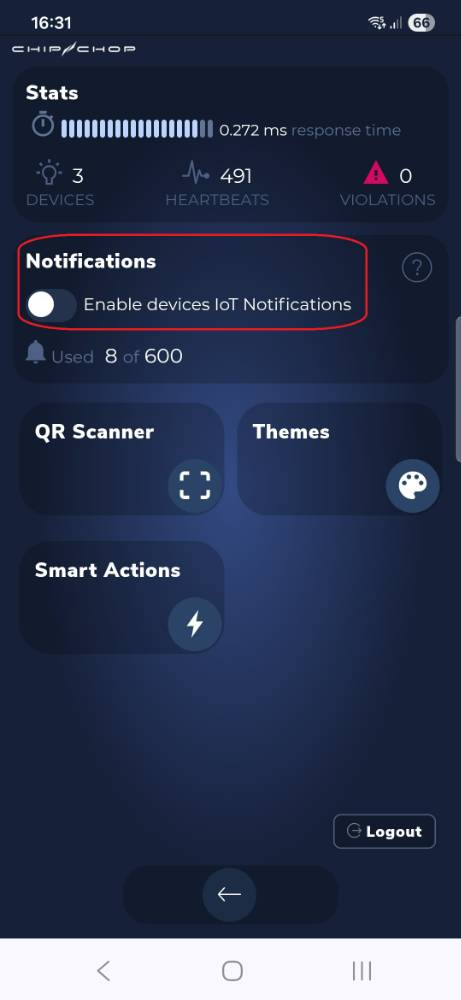
I have a very naive question.... How to enable notifications on my Android phone? I have tried evrything (reinstall, app permisions) apart from the right solution....

In the ChipChopWebApp I just can't move the switch marked with red frame. It doesn't react / move.


Regards
Tomasz


Attached images
Gizmo
02 Mar 2026

Oh man, I hate when that happens!

I am on Android and it definitely works. I have just checked and completely removed ChipChop app from the phone and re-installed it and activated the notifications. I am on Samsung S24 and I've always used Chrome to install web apps - not sure which phone or browser do you use?

It's all about permissions so if things get stuck the only thing you can do is to delete the app (shortcut) that you have on the desktop, clear the browser history (cache) and then install the app again...make sure you use https:// as notifications have to go through secure https://

When you activate the notifications you should receive a notification within 5-10 seconds to say that it's working and the button should stay active.

The most likely problem is with the browser not activating the app's "service worker" correctly, once it's activated it will work correctly pretty much forever but it can be a pain in the ass if for some reason it fails on the first try and then stays stuck. I've done a fake "micro-update" to the app so it may force your phone to refresh everything (in case it installed something half-way and it's now cached).
Also, when you open the app url in the browser refresh the page and wait for a second or two (do it 2 times) before you add it to the home screen.

Try again and let me know. If it doesn't work we'll try few more things

TomaszB
02 Mar 2026

Thanks Gizmo.

I have applied all these steps and additionaly I have allowed notification for freshly installed app before it was launched it (or at least before attempting to turn notifications on in the app itself). It works now!

One message above in this thread, I have also proposed logic of the notifications supression mechanism. Maybe you find it somehow helpful.

Greetings from PL
Tomasz

Gizmo
03 Mar 2026

That's great!

I have read your suggestions and I am already working on some stuff. I will need few days before I have a working prototype and it's pretty much going to work as you have described it.

I will post here when it's ready to test

G
Gizmo
04 Mar 2026

I have implemented 2 new options for the Actions.

In the THEN section you have now a menu to set the "Action run mode" and that gives you these options:

- Run always (default)
- Run and then pause for specified time
    - Pause time in minutes (1-10,000)
- Run and then pause until IF is false at least once

It's almost what you've described just broken into two but I will also add option 4 combining 2 & 3 together. Just want to test this first.

Explanation:

Run and then pause for specified time

When the IF condition is true the action will run once and then calculate when it can run again based on the time you specify.
This effectively "pauses" the Action (same as changing the status to Not Active) until the next available run time

This gives you a simple solution to suppress notification for some preset time - min 1 minute , max approximately 7 days

Run and then pause until IF is false at least once

When the IF condition is true the Action will run once and then flag itself as "paused". It will only un-pause itself when on subsequent runs the IF condition turns false.

This should work nicely if for example a temperature goes high, the action sends a notification and then waits until the temperature drops below the whatever is the high level, and then if it goes high again the cycle restarts....
It's pretty much what you were saying about tracking a transitional state.

This mechanism wouldn't work that well though if you have something that changes values like a yo-yo - up/down/up/down within short intervals so that's why I will have to implement another option to combine the two like you've described (will need more time)

Note: I have made these pause options to be "global" for the entire action and not just for notifications as I think it can be more useful - if you have more things happening in the THEN but for example only want a pause option on notifications you can simply duplicate the action and split the pause logic


Have a play and let me know what you think


G


TomaszB
04 Mar 2026

Thank Gizmo.

I'm very excited to test it. Will let you know as soon as I check it.
The funniest part is that it will not require any changes in my iot.

Tomasz
TomaszB
04 Mar 2026

Hi Gizmo

The new logic works very well (but still testing!). Very useful and easy to use

A small detail that I've found so far:
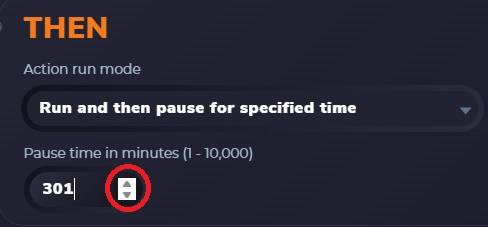
When you change an interval using small up and down arrows, the Save button doesn't appear. If the same value is modified from keyboard the Save button works correctly.


Kind regards
Tomasz


Attached images
Gizmo
05 Mar 2026

f*☠️🍆💣 browsers...grrrr

It should work now :-)
TomaszB
05 Mar 2026

Yeah, now it works. Thanks!